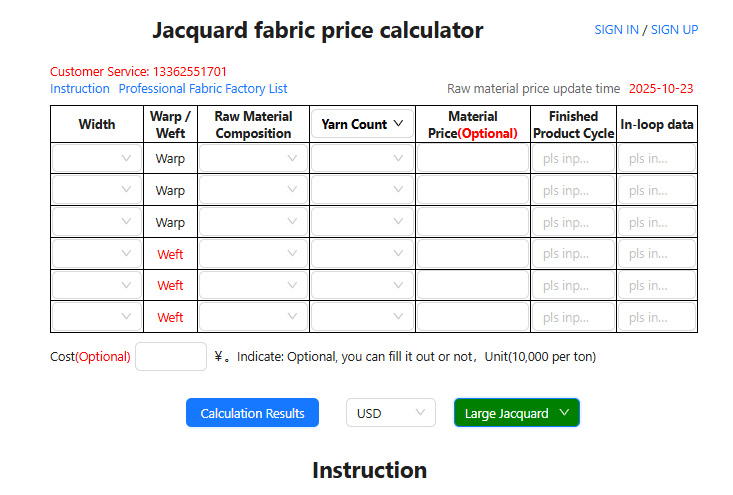
🧩 Main Field Descriptions (Revised 2025)
| Field Name | Function / Input Notes |
|---|---|
| Width | Fabric width (finished width from edge to edge, in inches). This is a dropdown selection field, with common options such as 53/54 or 55/56. The selected width directly affects the fabric weight conversion and total cost. |
| Warp / Weft | This is not a dropdown menu and cannot be modified. The system automatically displays “Warp” (longitudinal yarn) or “Weft” (transverse yarn). If the yarn belongs to the warp, fill in under the warp row; if it belongs to the weft, fill in under the weft row. This field allows the system to distinguish yarn direction in the backend formulas, ensuring accurate calculation of yarn usage and cost for both warp and weft. A jacquard fabric typically contains multiple warp and weft yarn groups that must be entered row by row. |
| Raw Material Composition | Dropdown menu to select the actual yarn material type, such as Cotton, Polyester, Viscose, or Nylon. The system automatically matches the corresponding market price for each selected material. |
| Yarn Count | Dropdown selection for actual yarn count, such as 40s, 32s, or 20/2. The higher the yarn count, the finer the yarn, and usually the higher the fabric cost. This is a numeric selection field that must correspond with the chosen material composition. |
| Material Price (Optional) | Optional manual input for the current material price (unit: 10,000 RMB/ton, as indicated at the bottom “Unit(10,000 per ton)”). If left blank, the system will automatically use the latest market price. This field is useful when applying a customized material cost. |
| Finished Product Cycle | Input the pattern repeat length for jacquard fabric. The unit is centimeters (cm), as all backend calculations are based on centimeters. This value directly affects the number of warp and weft threads per repeat and the final unit price. |
| In-loop Data | Input the number of warp and weft threads contained within one pattern repeat. The system uses this data to calculate total yarn usage — one of the key parameters for generating accurate cost estimates. |
⚙️ Bottom Buttons & Options Description (Full Version)
| Button / Option | Function / Notes |
|---|---|
| Calculation Results |
After all required fields (width, warp/weft, material composition, yarn count, loop data, etc.) are completed,
click this button to start the calculation. The system will automatically generate the following results: ① Grey Fabric Price (RMB/m); ② Weight (GSM); ③ Dyed Fabric Price (RMB/m); ④ FOB Price (foreign currency/m or yd). This is the core operational button for the entire page. |
| USD (Currency Selection) |
Dropdown menu for selecting the currency unit of the FOB price. Default is USD.
If no selection is made, the system outputs the FOB price in USD.
If another currency (e.g., EUR, JPY) is chosen,
the FOB price will be displayed in that currency. Note: Grey and dyed fabric prices are always calculated in RMB per meter. |
| Large Jacquard (Pattern Type Selection) |
Used to select the jacquard pattern type. There are four options: ① Large Jacquard ② Small Jacquard ③ Large Jacquard Twisting ④ Small Jacquard Twisting Users should choose the option that matches their actual fabric pattern structure, since different pattern types require different loom settings, weaving processes, and production costs. The backend system automatically applies the corresponding cost formula and loss coefficient to generate an accurate cost result. |
📊 Calculation Result Field Descriptions
| Field Name | Function / Data Description |
|---|---|
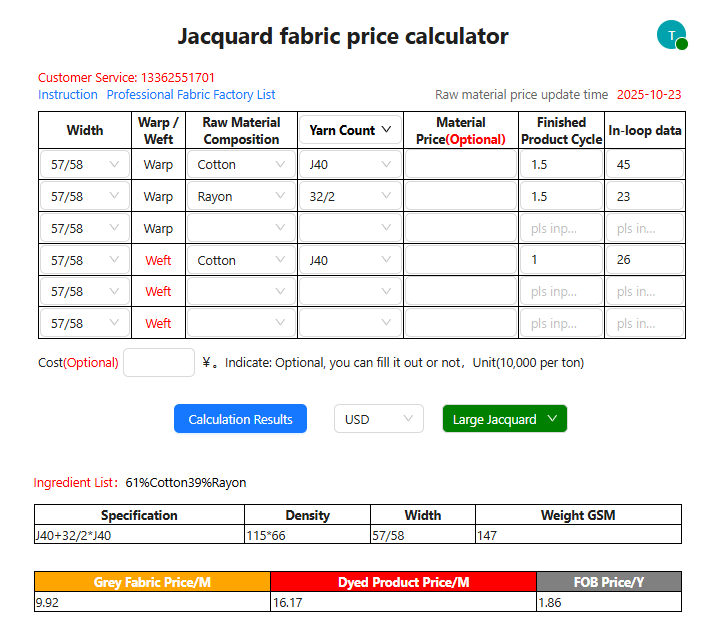
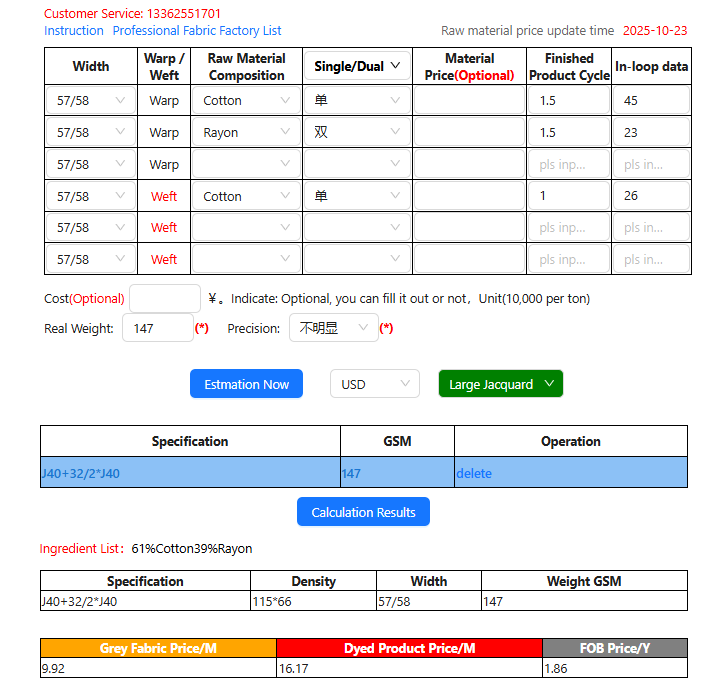
| Ingredient List | Displays the main material composition of the fabric. This is calculated based on the previously entered data, showing the actual percentage of each raw material per meter of fabric. For example, “61% Cotton 39% Rayon” means the fabric contains approximately 61% cotton and 39% rayon yarns. |
| Specification |
Shows the yarn configuration formed by combining the warp and weft yarn counts.
For example, “J40 + J32/2 * J40” means: the warp uses 40s and 32/2,
and the weft uses 40s yarns. Note: The part before the “*” symbol represents the warp, and the part after represents the weft. |
| Density | Displays the fabric density — the number of warp and weft threads per inch. For example, “115*66” indicates 115 warp ends per inch and 66 weft picks per inch. This data is automatically calculated by the system based on Finished Product Cycle and In-loop Data. A higher density results in a tighter fabric surface, which also increases GSM and cost accordingly. |
| Width | The finished width of the fabric from edge to edge, measured in inches. This value comes directly from the user’s selection in the input form, such as “57/58”. |
| Weight GSM | Shows the weight of the fabric per square meter (GSM, grams per square meter). The system calculates this value automatically based on the loop data and yarn count, reflecting the thickness and density of the fabric. A higher GSM indicates a heavier, denser fabric and typically results in higher production costs. |
| Grey Fabric Price / M | The cost of greige (unfinished) fabric per meter, calculated based on raw material cost, density, pattern repeat, and weaving losses. The unit is RMB per meter (RMB/m). This price excludes dyeing and finishing costs and serves as a reference for raw fabric quotations. |
| Dyed Product Price / M | The finished fabric price per meter, calculated by adding dyeing, finishing, wastage, and additional processing fees to the greige fabric cost. The unit is RMB per meter (RMB/m). |
| FOB Price / Y | FOB (Free On Board) export price. The system automatically converts the cost into the selected currency based on current exchange rates. The unit is USD per yard (USD/Y). This price is mainly used for export quotations and is displayed in the currency chosen from the dropdown menu (e.g., USD, EUR, JPY, etc.). |
🧵 How to Determine Yarn Thickness by Sample Comparison
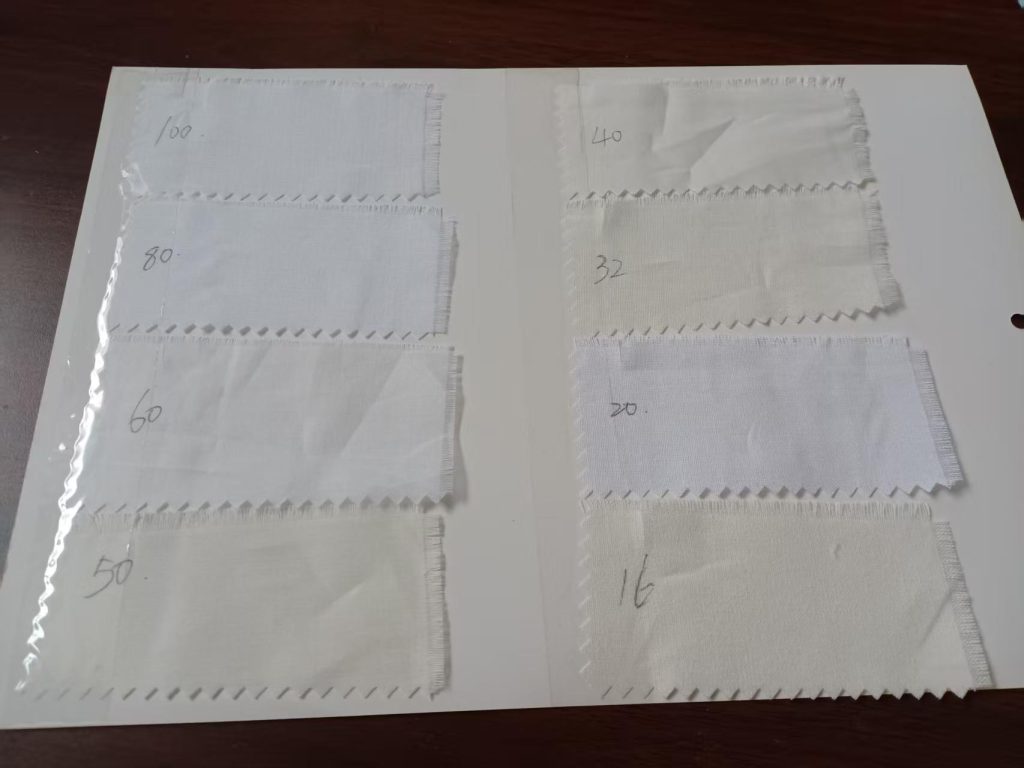
When the yarn specifications are unknown and you only have a fabric sample, it is recommended to prepare a set of standard reference fabrics to compare and identify the approximate yarn thickness and structure.
For example, you can prepare the following common 100% cotton fabric samples for comparison:
- 16×16 / 68×60
- 20×20 / 60×60
- 32×32 / 68×68
- 40×40 / 110×70
- 50×50 / 90×88
- 60×60 / 90×88
- 80×80 / 90×88
- 100×100 / 90×88
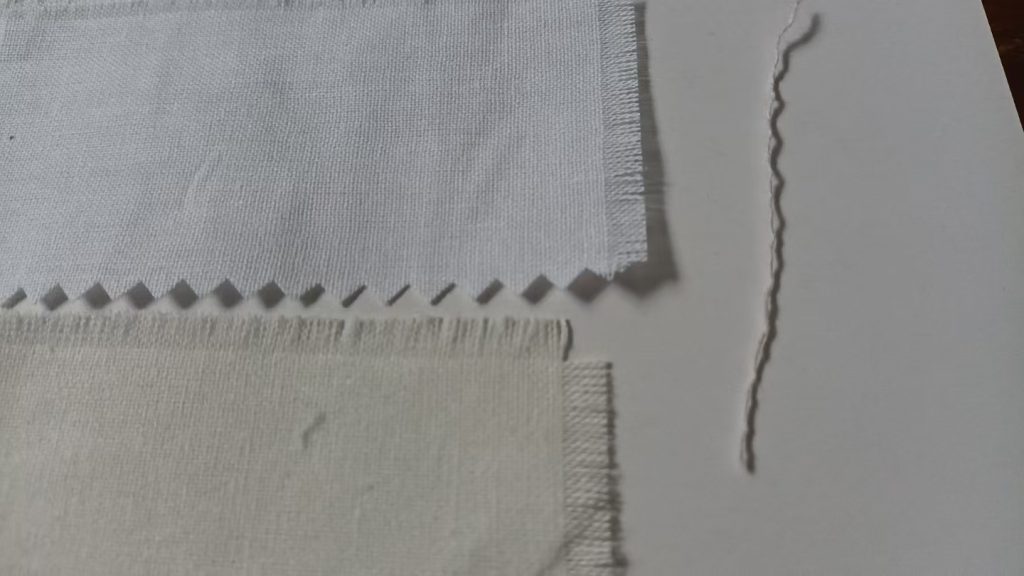
During comparison, as shown in the image, pull out a single yarn from the sample and visually compare it with the yarn from a standard fabric sample, focusing on its thickness, smoothness, and tightness.
Note: Make sure both yarns are stretched straight and taut during comparison. Avoid any bending or folding, as it may affect the accuracy of thickness judgment.
Tip: The approximate relationship between double-ply and single-ply yarn thickness is as follows:
32/2 ≈ 16 80/2 ≈ 40
Understanding this relationship helps you make more accurate judgments during visual comparison.
This simple method allows you to quickly estimate the approximate yarn count range of an unknown fabric, providing a more accurate reference for the system’s reverse-calculation process.
🧮 Main Field Descriptions of Sample Reverse Estimation Mode (Used When Yarn Specifications Are Unknown)
| Field Name | Function / Input Notes |
|---|---|
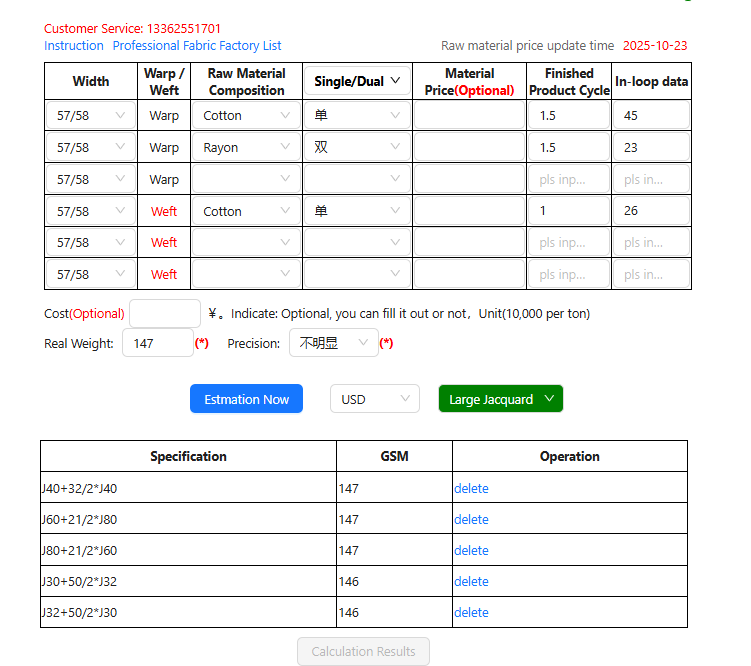
| Single / Dual |
This option is located within the Yarn Count dropdown menu and allows you to choose between Single and Dual yarns. “Single” refers to single-ply yarn, while “Dual” refers to two-ply yarn (two single yarns twisted together). This distinction can usually be identified by visual inspection. When the yarn count is unknown, selecting single or double ply helps the system determine the approximate yarn thickness and corresponding weight formula, enabling a more accurate estimation of total yarn consumption and fabric cost. |
| Real Weight |
Enter the actual measured weight of the fabric sample, i.e., the real GSM (grams per square meter) value. Note that this should be the fully processed dyed fabric weight. Generally, fully finished fabric is about 5% lighter than semi-finished fabric, as the full process includes a mercerizing step. To distinguish between fully processed and semi-finished fabric: view the fabric surface horizontally — semi-finished fabrics tend to have visible fuzz and a less glossy surface. Unit: grams per square meter (g/m²). This is the key parameter for reverse calculation — the system estimates the total yarn usage per square meter based on GSM, density, and fabric width, then calculates the greige fabric cost using the automatic material price. |
| Precision |
This option controls how precisely the system matches possible yarn combinations. Judging method: pull out one yarn from both the warp and weft directions, stretch them straight, and compare their thickness visually. Available options: - Unlimited: The system calculates all possible yarn combinations (default mode). - Not Obvious: The warp and weft yarns are about the same thickness, no clear difference by eye. - Warp Thicker: The warp yarn is thicker than the weft yarn. - Weft Thicker: The weft yarn is thicker than the warp yarn. Adjusting the precision setting helps the system better match the actual yarn structure of the fabric sample. |
| Estimation Now |
Click this button to instantly let the system estimate the fabric’s possible yarn combinations based on your entered parameters
(material type, structure, repeat, GSM, etc.). The output includes the estimated warp and weft yarn counts, greige fabric price, dyed fabric price, and FOB export price. This is the core function button of the Sample Reverse Estimation Mode. |
🧵 Yarn Specification Combination Filtering & Calculation Guide
Among the multiple yarn specification combinations calculated by the system, users can filter and select based on the actual characteristics of the fabric sample. First, compare the appearance of Single yarn and Dual yarn, and perform a simple visual comparison between the fabric sample and standard yarn samples.
Eliminate combinations that are visually inconsistent with the actual fabric sample (for example, yarns that are obviously thicker, thinner, or structurally different), and keep the yarn specification combination that most closely matches the real fabric structure.
After selecting the desired combination, click the “Calculation Results” button. The system will automatically calculate all parameters for the fabric with unknown yarn specifications, including detailed data such as structure, GSM, greige fabric price, dyed fabric price, and FOB export price.